

Skip to content

Falcon · voice and typed assistant

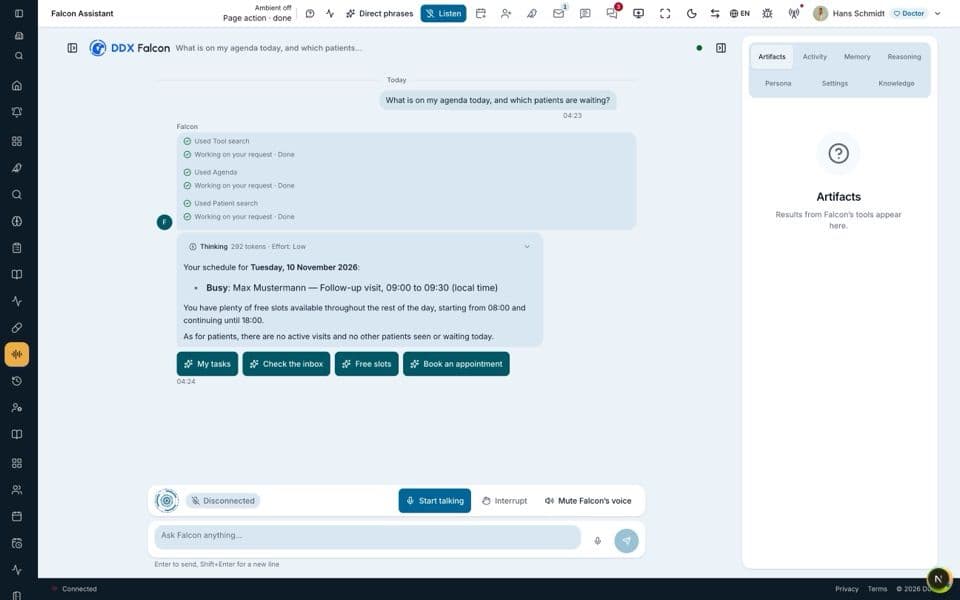
Falcon, the assistant you speak or type to

Say or type what you need.

Falcon is the staff assistant for doctors, nurses and reception: say or type what you need, and it works on the request in Dudoxx. It is built for staff, and it does not answer the phone.

What Falcon is built for

  • Voice commands

    A short spoken request opens a patient, notes a reminder or asks for a value.

  • Voice form filling

    The clinician speaks the answers, the fields fill in, and the clinician confirms each value.

  • Answers from the record

    Falcon answers questions from the patient's record in plain words, without opening several screens.

Watch how it works

A narrated tour of the real screens, chapter by chapter.

Falcon and voice

Falcon on top of Condor, ambient voice commands across the platform, and how the assistants use your data.

Narrated in: English11 chapters

All manuals

Falcon at work

  1. Speak or type

    Say a request or type it: both reach the same assistant and are handled the same way.

  2. Staff first

    Falcon is for the people who work in the clinic: doctors, nurses and receptionists.

From a spoken request to a confirmed result

Falcon: a voice loop where the doctor approves every change out loud or with a tap Staff voice loop: the doctor speaks or types; speech is turned into text once the doctor has finished; Falcon chooses its tools and says what it is doing; reads answer at once, while a change raises an approval card showing the change, approved by a spoken yes that matches the card or by a tap; the action runs with the doctor's role rights and the answer is spoken back. Unsure words are read back before any change; interrupting stops a read, a started change completes. Patient portal, off by default: a non-medical helper for pages, invoices and appointments that books the free slot the patient picks after an on-screen confirmation; it gives no medical advice, and the emergency notice is fixed text. audio transcript Doctor speaks or types in the dock 1 Speech to text waits until you finish 2 Falcon Tools chosen says what it is doing 3 a change reads answer at once approved result Spoken approval say yes or tap the card 4 Action done with your role's rights 5 Answer spoken text to speech 6 Approval: the card shows the change before it runs. A spoken yes counts only after Falcon read the card back, and only if day, time and doctor match. Unsure words or names are read back before any change. Interrupting stops a read at once; a change that has started still completes. With two approvals waiting, voice decides neither: only the buttons do. next command · interrupt any time ON THE PATIENT PORTAL · A NON-MEDICAL HELPER · OFF BY DEFAULT Patient asks signed in · own clinic Portal help pages · invoices · visits Free slots the patient picks one Patient confirms on-screen read-back No medical advice fixed refusal, then a message to staff Emergency notice fixed text, never AI 112 · 116 117 the answer human checkpoint starts here fixed text, no AI automatic step waits for approval
Falcon: a voice loop where the doctor approves every change out loud or with a tap Staff voice loop: the doctor speaks or types; speech is turned into text once the doctor has finished; Falcon chooses its tools and says what it is doing; reads answer at once, while a change raises an approval card showing the change, approved by a spoken yes that matches the card or by a tap; the action runs with the doctor's role rights and the answer is spoken back. Unsure words are read back before any change; interrupting stops a read, a started change completes. Patient portal, off by default: a non-medical helper for pages, invoices and appointments that books the free slot the patient picks after an on-screen confirmation; it gives no medical advice, and the emergency notice is fixed text. audio transcript a change approved result reads answer at once Doctor speaks or types in the dock 1 Speech to text waits until you finish 2 Falcon Tools chosen says what it is doing 3 Spoken approval say yes or tap the card 4 Action done with your role's rights 5 Answer spoken text to speech 6 Approval: the card shows the change before it runs. A spoken yes counts only after Falcon read the card back, and only if day, time and doctor match. Unsure words or names are read back before any change. Interrupting stops a read at once; a change that has started still completes. With two approvals waiting, voice decides neither: only the buttons do. next command · interrupt any time ON THE PATIENT PORTAL · A NON-MEDICAL HELPER · OFF BY DEFAULT books Patient asks signed in · own clinic Portal help pages · invoices · visits Free slots the patient picks one Patient confirms on-screen read-back No medical advice fixed refusal, then a message to staff Emergency notice fixed text, never AI 112 · 116 117 the answer human checkpoint starts here fixed text, no AI automatic step waits for approval

The Falcon voice loop in six steps, from the spoken request to the spoken answer. An answer is read out at once; a change waits for a yes. Below it: the patient-side helper for non-medical questions, off by default.

Open the full diagram (opens in a new tab)

What teams ask about Falcon

Hear Falcon in a demo

Bring the requests your desk makes most often.